Solving the Mystery of the Disappearing Disk Space

Last December, I got a new laptop, and have been using it for most of my work since then. I store client files, blog posts, sample Excel files for my Contextures website, and a few too many digital photos.

The laptop has about 1 TB of disk space, so I should be okay for a while – or so I thought.

Almost Out of Space

Last week, I noticed that the C drive was almost at capacity – it was showing a red bar in Windows Explorer. Yikes! I didn’t ever run into that problem in the old laptop, and I used it for a few years.

What was filling up the drive? Had I really taken so many photos that I’d hit the limit?

Then I noticed that my storage space had been split into 4 drives, and the C drive only had 186 GB. So, I moved all the photos, and some of the documents to the other drives, and that temporarily solved the problem.

Can’t Open Outlook

Then, a crisis hit – Outlook wouldn’t open because it didn’t have enough disk space.  I moved a few more files to the other drives, emptied the Recycle Bin, and got Outlook running again. Whew!

But I can’t work like that – I don’t want to be constantly worrying about disk space. What was filling up the disk, and how could I get that stuff into a different drive?

Check the Folder Properties

I started through the folders again, checking each one’s properties, and looking for unusually large items. Was a program taking more that its share of the space? Was Windows 8 the culprit.

Finally, I found one of the Temp folders, in the AppData > Local directory, and it looked pretty full. Sometimes an installation file gets stuck in there, and they can be a few hundred MB in size.

I sorted the list in descending order by file size, and was shocked to see this item at the top of the list. It was a text file, named toolbar_log.txt, and it was 53 GB!
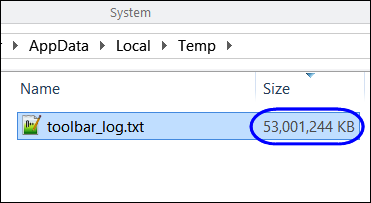
toolbar_log.txt

Of course, Notepad++ couldn’t open it, because it was so huge, so I couldn’t see what was in the file. A Google search showed that it was a file created by the AVG security software, and other people were complaining about its size.

Delete the Rogue File

The online information indicated that it was safe to delete the file, but AVG would just recreate it.

So, I did, and as predicted, the file came back. As I watched in Windows Explorer, the file size increased every few seconds.

I deleted it again, and followed the advice in one of the online comments – I set the file to Read Only.

Problem Solved

So far, so good – the file is about 500 KB, and holding. I haven’t noticed any effects from changing the file to Read Only, except for the benefit of 53 GB of free space on my C drive.

I’ll sort out the folders and files, to spread things around, not that the crisis is over. And I’ll add a few Libraries, to make it easier to get to my files, after they’re moved.

I hope you never run into this problem, but if you have AVG installed, you might want to check for a file named toolbar_log.txt – and make sure it isn’t eating up your space.

___________

Neck Strap for an iPhone

Most of the time, my iPhone is stored safely in my purse or pocket. Sometimes though, I like to use it as a camera, and I worry about dropping it.

For example, I had a nice view of the harbour from the lighthouse on Hilton Head Island, but stayed back from the railing a bit. I didn’t the phone to fall 90 feet to the ground!

IMG_7403

And this week, I held it tightly while shooting this picture from a bridge over a local river. The bridge wasn’t very high, but the landing is a bit wet.

IMG_7865

Looking for a Wrist Strap

I looked online for iPhone wrist straps, and wasn’t impressed with what I saw. Most were plugged in to the cable slot, and didn’t seem too secure.

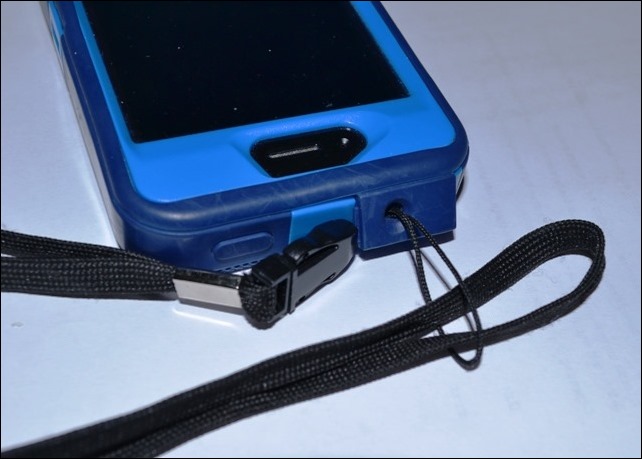
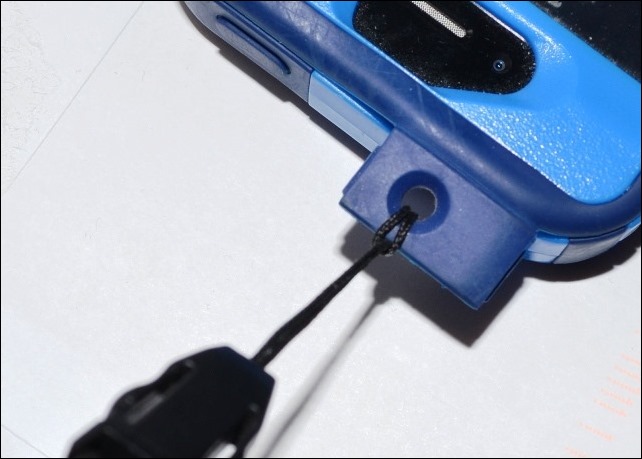
My point and shoot camera has a little wrist strap, and a small slot on the side where the strap is attached. I didn’t see a slot on the iPad, but there is a small flap with a hole, at the top of the OtterBox iPhone case.

So, I found an old neck strap in my office drawer – it came with a USB drive – and pushed its cord through that hole.

DSC_0006

Then, I looped it over the lanyard strap, and pulled it tight. Perfect!

DSC_0002

Now, when I’m using the phone as a a camera, I can wear the neck strap, and not worry about dropping that very expensive “camera”.

If you’ve found a better solution, please let me know.

________________

Turn Off an ASUS Laptop Touchpad

Last week, I got a new laptop, with Windows 8 as the operating system. Every task is taking twice as long as usual, as I fumble about, trying to find things.

I like the laptop though, which is much faster and quieter than the old Dell laptop. I’ve gone back to a 17” screen, after a few years with a 15” screen.

asusn76v

Turn Off the Touchpad

I used to have trouble with the touchpad on the Dell, touching it accidentally, and having strange things happen. However, the problem is much more noticeable on the ASUS, with its gigantic touchpad.

In the middle of doing something, my thumb brushes it, and I end up on the Windows 8 start screen, or in some maximized window, with no obvious escape route.

So, I reluctantly opened the manual, and found a key combination that toggles the touchpad on and off.

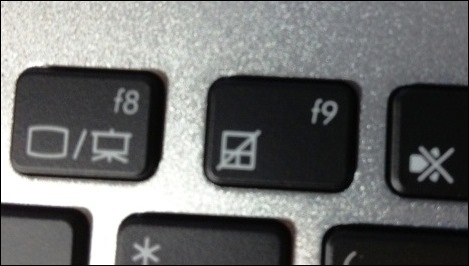
Press the Fn key and tap the F9 key.

To help me remember the shortcut, they’ve even put an icon on the F9 key, which you can see in the picture below.

asusfnkeys

Do You Use the Touchpad?

I’ve only used a computer’s touchpad a few times in my life, and never voluntarily, only when a mouse wasn’t available.

Do you ever use the touchpad?

___________________

Email to the Next Desk

Ah, serendipity! Today it led me from a kitchen calendar to the invention of network email.

The Milk Calendar is an annual tradition in Canada, and there’s always one hanging on my kitchen wall. The calendar is a free insert in the weekend newspaper each year, in mid-November.

I’ve stopped getting the daily paper though, and read the news on my iPad every morning. Fortunately, I found the Dairy Farmers of Canada website, where you can order a free calendar (unless you live in Quebec, or the Territories).

The Milk Calendar Timeline

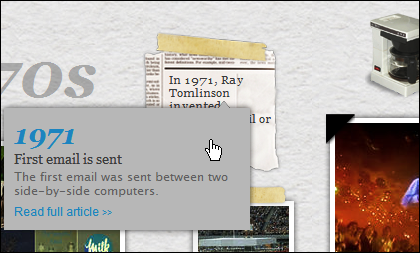
On their website, I clicked to see the milk calendar timeline, which is pretty bad, with the years out of order in several places. One of the early events was in 1971, when Ray Tomlinson invented email:

First email is sent. The first email is sent between two side-by-side computers.

milkcalendaremail 

Ray Tomlinson Website

I don’t remember hearing about Ray Tomlinson before, and a Google search led me to his personal website, where you can see an old teletype keyboard, with the infamous @ character on the “P” key. You can also see the two side-by-side computers involved in the first network email.

Ray also answers some FAQs, and clears up some common mistakes about that first network email. He says:

Probably the only true statements about that first email are the it was all upper case (shouted) and the content was insignificant and forgetable (hence the amnesia).

Email to the Next Desk

What struck me about this story was the emphasis on the fact that the first network email only went to the next desk. These days, we can send email anywhere in the world, but I’ll bet that the majority of them just go down the hall, or into the next cubicle.

Some of my emails go to clients who are across the continent, or to friends on the other side of the world. But several emails a day actually go to myself – if I’m reading something on the iPad, I’ll send the link to my Outlook email, for follow-up later.

How about you? Is most of your email just going to the next desk?

____________________

iPad in the Kitchen

When I got my iPad, I wasn’t sure how useful it would be, or what business apps I’d find for it. So far, the search for a satisfactory spreadsheet app has been fruitless. I’ve bought the Numbers app, but can’t get used to it.

However, I do use the iPad every day to read email, RSS feeds, and blog comments, so it was definitely a good investment.

Non-Work iPad

Of course, the iPad is useful for non-work activities too, and I occasionally use it in the kitchen, to read a recipe from a website.

When using it, I make sure that the iPad is out of the spatter zone, or if things are getting messy, I put it into a big Ziploc bag. The touch screen still works, and the iPad is safe from mishap.

I couldn’t believe that Think Geek is now selling what is basically a ZipLoc bag now, to seal up your iPad in the kitchen. Would you pay $20 for 25 of these “iPad Chef Sleeves”?

My advice is to save your money, and pick up a box of ZipLoc bags the next time you’re at Costco, or the grocery store.

iPad Chef Sleeves

___________________

A Guided Tour of Macintosh

When was the last time that you got a cassette tape with your new computer?

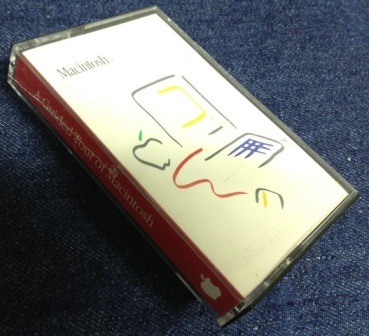
I found this tape – A Guided Tour of Macintosh — while cleaning out the basement today, and it came with our shiny new Macintosh in 1984. The Mac also came with printed manuals, quick start guides, and countless floppy disks.

mactape

That computer, which is still in the basement, didn’t have a hard drive, but we bought an external floppy drive, so we could have two disks available for copying and pasting.

It was way overpriced, compared to the other computers of the time, but we loved it, spent hours staring at that small built-in black and white monitor. Good times!

________________

Free Data Analysis Courses at Johns Hopkins

How are your data analysis skills? Excel is certainly making a push to be a “self-service BI tool” in the next version of Office, using PowerPivot and PowerView.

Besides Excel, there are other tools for analyzing data, and free university courses, through coursera.org, to help you get started. I’ve listed a few of the courses here, to give you an idea of what’s available. They require a sizeable chunk of time each week, during a set time period. The courses also have major projects or a final exam, so don’t sign up if you like to take things at your own pace.

Data Analysis

There is a Data Analysis course, led by Assistant Professor Jeff Leek, from the Simply Statistics blog. The course starts Jan. 22, 2013, and runs for 8 weeks. The workload estimate is 3-5 hours a week, with short video lectures and two major projects.


One of the prerequisites for the Data Analysis course is some familiarity with the R statistical programming language (http://www.r-project.org/). I’ve never used it, but R is a free download, and you have almost 6 months to learn a bit about it before the Data Analysis course starts.

Computing for Data Analysis

To get up and running with R, you could enroll in one of the other free courses – Computing for Data Analysis with Associate Professor Roger D. Peng. It’s a 4 week course, starting September 24, 2012, with about 3 hours of video per week, and 2 major projects.


Learn to Program: The Fundamentals

And if you’re completely new to programming, a University of Toronto course can help you learn the basics. Senior Lecturers Jennifer Campbell and Paul Gries, use Python as the language in their introductory course, Learn to Program: The Fundamentals.

Their course starts on September 24, 2012, and runs for 7 weeks. It’s estimated that the workload is 6-8 hours per week, with quizzes and a final exam.


___________

Using Google Reader on the iPad

This morning I checked my iPad, to see how much storage space is left. I have the 32 GB version, because I figured that by the time it’s filled up, a newer, shinier version would be available.

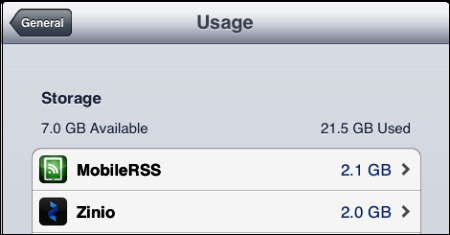
With iOS 5, you can go to Settings > General > Usage, to see the storage space available, and a list of the top 10 space-hogging apps. Uh-oh, there’s only 7 GB of storage left.

ipadusage01

The Major Space Hogs

I was surprised to see the MobileRSS app at the top of the list. That’s what I use to read the RSS feeds in Google Reader, while enjoying my morning coffee.

MobileRSS is one of the apps that I use every day, so I’m not going to uninstall it, just because it’s a space hog. Maybe it would use less space if I don’t “star” so many articles. I’ve also been unsubscribing from feeds that aren’t useful to me, so that might help too. Don’t worry though – your blog’s feed is still in my list. 😉

The Zinio app is the second worst space hog, but that’s not surprising, because I use it for a few magazine subscriptions. Maybe some old issues can be deleted, to make it a bit smaller, if the iPad space gets really tight.

Deleting Unused Apps

Looking at the rest of the items in the top storage list showed that there were many apps that could easily be deleted, because I never use them.

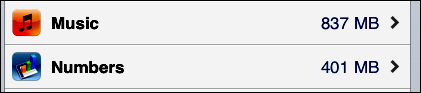
I left Numbers on the iPad, despite the fact that it’s one of the highest space users, at 401 MB, and I don’t use it very often. It cost $9.99, and I’m determined to get my money’s worth from it, eventually. I wonder how big Excel will be, when its iPad version is released, and how much it will cost. What’s your guess?

ipadusage02

The good news is that the iPad now has 14 GB of storage space available, so I can start downloading more stuff that I’ll never use!

___________