The iPad that I got last month is certainly enjoyable, but so far I haven’t found anything that even comes close to Excel. Maybe Numbers is better on the Mac, but it’s not winning me over on the iPad.
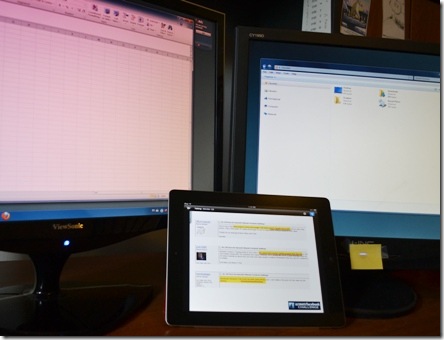
This week, though, I found a new use for the iPad – watching webinars with the free GoToMeeting for the iPad. With the iPad sitting between the two computer monitors, I can listen to the webinar, and glance at it occasionally. It’s perfect for those sessions that don’t require your full attention.
GoToMeeting App Advantages
It’s great — none of the valuable monitor real estate is used, and you can even zoom in on the iPad presentation to see something.
For the meeting that I attended, the audio was fine, without plugging in the earphones. Attendees were in “listen only” mode, but it looks like you can use the iPad microphone if the meeting organizer allows it.
GoToMeeting App Limitations
On the down side, none of the extra features for GoToMeeting are available, like chat, or screen sharing, or voting. And you can’t set up a meeting from the iPad app – you can only attend scheduled meetings.
So, this app will be perfect if you want to attend a webinar, and aren’t interested in posting questions, or other interactions during the meeting. Not recommended for client meetings, unless it’s an emergency!
_______________