Neck Strap for an iPhone

Most of the time, my iPhone is stored safely in my purse or pocket. Sometimes though, I like to use it as a camera, and I worry about dropping it.

For example, I had a nice view of the harbour from the lighthouse on Hilton Head Island, but stayed back from the railing a bit. I didn’t the phone to fall 90 feet to the ground!

IMG_7403

And this week, I held it tightly while shooting this picture from a bridge over a local river. The bridge wasn’t very high, but the landing is a bit wet.

IMG_7865

Looking for a Wrist Strap

I looked online for iPhone wrist straps, and wasn’t impressed with what I saw. Most were plugged in to the cable slot, and didn’t seem too secure.

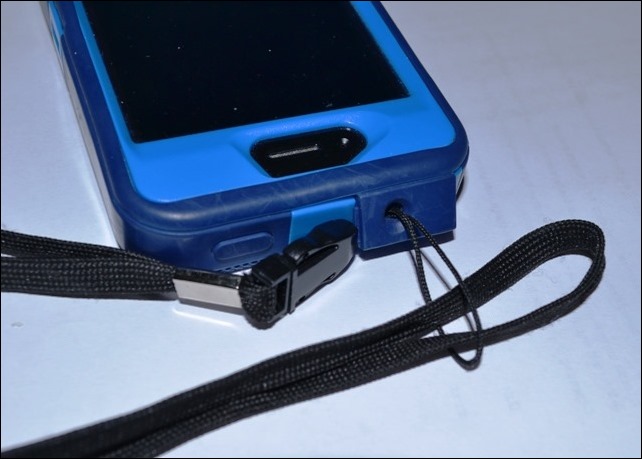
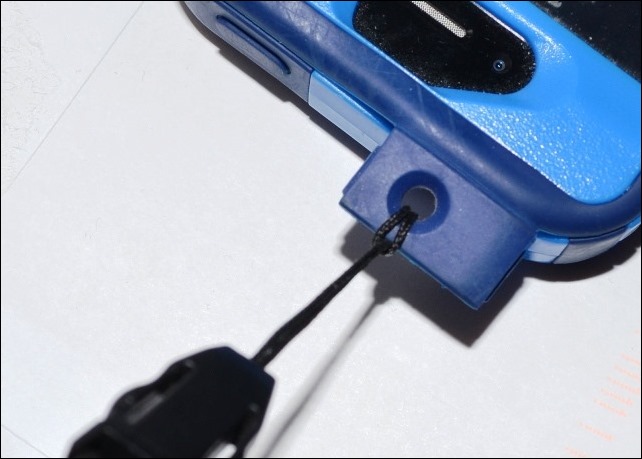
My point and shoot camera has a little wrist strap, and a small slot on the side where the strap is attached. I didn’t see a slot on the iPad, but there is a small flap with a hole, at the top of the OtterBox iPhone case.

So, I found an old neck strap in my office drawer – it came with a USB drive – and pushed its cord through that hole.
DSC_0006

Then, I looped it over the lanyard strap, and pulled it tight. Perfect!
DSC_0002

Now, when I’m using the phone as a a camera, I can wear the neck strap, and not worry about dropping that very expensive “camera”.

If you’ve found a better solution, please let me know.

________________
Pivot Tables and Productivity

My favourite tweet in yesterday’s Excel Twitter collection was this one:

  • I feel like I know JUST enough about pivot tables to make all of my tasks 30 times harder #Excel #productivity #tcot

Does that ever happen to you? Maybe it’s not pivot tables – it could be another one of Excel’s powerful, but frustrating features.

You start a workbook, then add a bit of code, or a fancy formula, and things suddenly go south. So, you try to troubleshoot the problem, wander over to Google for some research, and before you know it, an hour has passed. Oop! There goes your productivity.

Pivot Table Articles

But, if pivot tables are your problem, I’ve published a couple of articles this week that might help you out.

Block (All) Selections

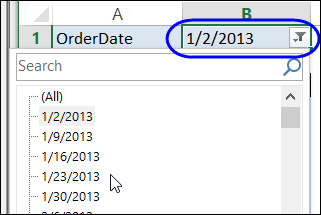
On my Excel Pivot Tables blog, there is sample code that prevents people from selecting the “(All)” option in a report filter drop down. That can be useful if you’ve got worksheet formulas or links that depend on one item being selected.

Here’s the link to that article: Block Selection of All in Report Filter

vbablockall03

List Pivot Formulas

And on my Contextures Blog, you can find sample code that lets you list all the pivot formulas in the active workbook (calculated items and calculated fields).

Here is the link to that one:  List All Pivot Table Formulas

pivotformulaslist

________________

Problems with Windows Live Writer Videos

Do you use Windows Live Writer (WLW) to write and upload blog posts?

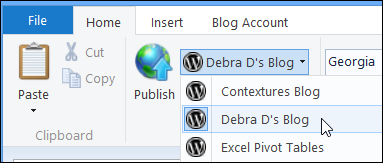
I’ve been using it for a few years, and it’s an efficient way to manage multiple blogs. You can open WLW, select a blog name from a drop down list, and then post an article to that blog.

windowslivewriter01

Video Problems

Since I upgraded to WLW 12, using Windows 8, I’ve had trouble getting videos to upload correctly. I copy the embed code from YouTube, and paste it into WLW, and the video appears.

However, when it’s published on the blog, something has happened between WordPress and WLW, and the videos are stripped out.

To fix the problem, I have to log in to the blog’s dashboard, and paste the embed code in the HTML page there. After that, the video works correctly, but it’s a pain to have to do this for every upload.

If you’ve figured out a better solution, please let me know.

______________

Happy New Year 2013

Would you go for a plunge in the cold Atlantic Ocean on January 1st? Brrrr. I wouldn’t, but this morning I saw a group of teens, who had just come out of the water.

I don’t know how cold that water was, but the air temperature was about 50F, and I was wearing 3 layers of clothes.

IMG_4199

Try New Things

New Year’s Day is a popular time to make resolutions, and set goals for the upcoming year. I’ll try some new things this year, but polar swimming won’t be one of them!

Instead, I’ll focus on activities that won’t cause hypothermia, like

I’ll keep doing some of the old things two, such as working on my Contextures website and blog, and updating some of the older pages with new content and videos.

Happy New Year!

I hope that your new year is off to a good start, and that you look forward to trying a few new things too. Do you have anything exciting planned?

__________________

Turn Off an ASUS Laptop Touchpad

Last week, I got a new laptop, with Windows 8 as the operating system. Every task is taking twice as long as usual, as I fumble about, trying to find things.

I like the laptop though, which is much faster and quieter than the old Dell laptop. I’ve gone back to a 17” screen, after a few years with a 15” screen.

asusn76v

Turn Off the Touchpad

I used to have trouble with the touchpad on the Dell, touching it accidentally, and having strange things happen. However, the problem is much more noticeable on the ASUS, with its gigantic touchpad.

In the middle of doing something, my thumb brushes it, and I end up on the Windows 8 start screen, or in some maximized window, with no obvious escape route.

So, I reluctantly opened the manual, and found a key combination that toggles the touchpad on and off.

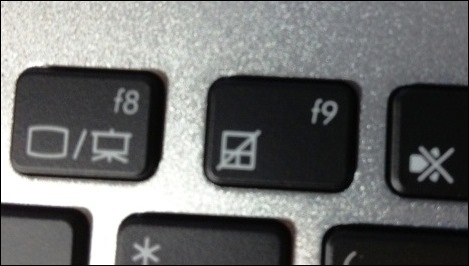
Press the Fn key and tap the F9 key.

To help me remember the shortcut, they’ve even put an icon on the F9 key, which you can see in the picture below.

asusfnkeys

Do You Use the Touchpad?

I’ve only used a computer’s touchpad a few times in my life, and never voluntarily, only when a mouse wasn’t available.

Do you ever use the touchpad?

___________________

Email to the Next Desk

Ah, serendipity! Today it led me from a kitchen calendar to the invention of network email.

The Milk Calendar is an annual tradition in Canada, and there’s always one hanging on my kitchen wall. The calendar is a free insert in the weekend newspaper each year, in mid-November.

I’ve stopped getting the daily paper though, and read the news on my iPad every morning. Fortunately, I found the Dairy Farmers of Canada website, where you can order a free calendar (unless you live in Quebec, or the Territories).

The Milk Calendar Timeline

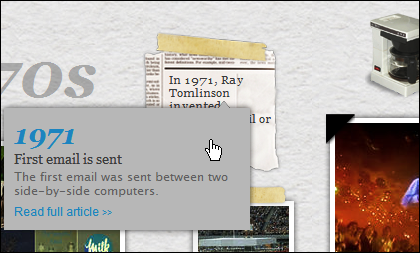
On their website, I clicked to see the milk calendar timeline, which is pretty bad, with the years out of order in several places. One of the early events was in 1971, when Ray Tomlinson invented email:

First email is sent. The first email is sent between two side-by-side computers.

milkcalendaremail 

Ray Tomlinson Website

I don’t remember hearing about Ray Tomlinson before, and a Google search led me to his personal website, where you can see an old teletype keyboard, with the infamous @ character on the “P” key. You can also see the two side-by-side computers involved in the first network email.

Ray also answers some FAQs, and clears up some common mistakes about that first network email. He says:

Probably the only true statements about that first email are the it was all upper case (shouted) and the content was insignificant and forgetable (hence the amnesia).

Email to the Next Desk

What struck me about this story was the emphasis on the fact that the first network email only went to the next desk. These days, we can send email anywhere in the world, but I’ll bet that the majority of them just go down the hall, or into the next cubicle.

Some of my emails go to clients who are across the continent, or to friends on the other side of the world. But several emails a day actually go to myself – if I’m reading something on the iPad, I’ll send the link to my Outlook email, for follow-up later.

How about you? Is most of your email just going to the next desk?

____________________

iPad in the Kitchen

When I got my iPad, I wasn’t sure how useful it would be, or what business apps I’d find for it. So far, the search for a satisfactory spreadsheet app has been fruitless. I’ve bought the Numbers app, but can’t get used to it.

However, I do use the iPad every day to read email, RSS feeds, and blog comments, so it was definitely a good investment.

Non-Work iPad

Of course, the iPad is useful for non-work activities too, and I occasionally use it in the kitchen, to read a recipe from a website.

When using it, I make sure that the iPad is out of the spatter zone, or if things are getting messy, I put it into a big Ziploc bag. The touch screen still works, and the iPad is safe from mishap.

I couldn’t believe that Think Geek is now selling what is basically a ZipLoc bag now, to seal up your iPad in the kitchen. Would you pay $20 for 25 of these “iPad Chef Sleeves”?

My advice is to save your money, and pick up a box of ZipLoc bags the next time you’re at Costco, or the grocery store.

iPad Chef Sleeves

___________________

Getting Results the Agile Way

There are so many great ideas running around in your head that it’s hard to pick just one to focus on. After hours of thinking, and Googling, and reading, and planning, you finally get started. And then, when you do start working on a project, it’s tough to let it go, because it’s never quite finished. Sound familiar?

Those are some of my daily challenges, while working on personal and client projects. Maybe there are some good tips in Getting Results the Agile Way, by J.D. Meier, who used to work at Microsoft.

The Kindle version of the book is free today on Amazon, instead of its usual price of $9.99. So, if you’re interested, grab a copy now, before the price goes back up. There is a Look Inside feature on the sales page, so you can skim through that before downloading it.

The description says that it’s 241 pages, which seems pretty long for an “agile” system. However, in the introduction, the author says that you can start in the Appendix section, which has “quick, step-by-step guidance for adopting the three key parts of Agile Results…you can immediately start getting the benefits of work-life balance and focused results”.

We’ll see!

______