Disaster Planning

Thirty years ago today, there was a huge explosion in Mississauga, when a train derailed, right in the middle of the city. I lived in Downsview, about 20 miles east, and felt the house shake, just before midnight, as though there had been a small earthquake.

The trains were carrying dangerous materials, including chlorine, so most of the city’s residents were evacuated – over 200,000 people. Amazingly, no one was seriously injured, or killed, and the evacuation went smoothly. The mayor somehow sprained her ankle, but kept going.  She’s still the mayor, and going strong, at age 88.

Here’s  a news video that shows some of the fire:

In 1982, I moved to Mississauga, and things have been peaceful since then. Then, in August 2008, a Downsview propane company exploded, less than a mile from the house I’d lived in during the Mississauga explosion. I guess I should plan to move in another 27 years or so!

In the meantime, perhaps some disaster planning would be prudent. If I had to evacuate, could I run this business from another location?

______________
Working From Home

I’ve been travelling to a client’s office this week, finishing up an Excel project. Hope to have the work done soon, before the snow and H1N1 pandemic hit. It’s better to be working from home under those conditions!

A short commute and reduced risk of infection are just two of the advantages of working from home. It’s also quieter, with fewer interruptions, and easier to focus.

When I started working from home, in 1985, my son was in kindergarten, so things definitely weren’t as quiet. And there were plenty of interruptions!

I didn’t do any internet based business back then, so completed client work had to be sent by courier, or hand delivered. Files weren’t too big, but still would have taken a long time to transfer on that dial up modem, even if clients were set up to receive them.

Clients sent drafts and edits to me by fax, and they were hard to decipher, some of the time. A phone call usually sorted things out, and sometimes a visit to the client was needed.

I never use the fax machine now, and rarely speak to clients on the phone. The modem is like a rocket ship, compared to the turtle that I started with, and most of my work is done by email.

Things sure have changed for my home based business, and I’ve never regretted my decision to work from home.

_________

Adding a Policies Page

In April, Google announced that all sites that used AdSense advertising had to post a privacy policy. So, I looked at a few other sites, and cobbled something together, and posted it on my Contextures website.

Recently, the FTC decided that bloggers had to disclose their affiliations, and use realistic testimonials in their advertising.

No one seems sure who’s affected by the new regulations, or how they’ll be implemented. Since I’m not based in the USA, the FTC doesn’t regulate me, but Google might insist that their publishers follow the guidelines.

Anyway, I decided to add a disclosure policy to my website and blogs, in a proactive move.

Have you posted one?

_____________

Creating Lists in Twitter

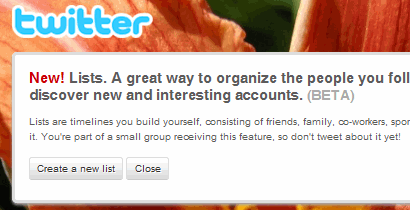
Funny. Only a day after I mentioned TweetDeck, and its Group feature, Twitter launched its new Lists feature.

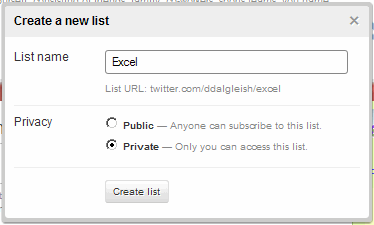
TwitterList01

Now I can create lists, such as Excel and Microsoft, and include the people who I follow into one or more of those lists.

Even better than TweetDeck groups, you can make your Twitter lists public or private.

 TwitterList02

If another user adds you to one of their public lists, you’ll see that in your Lists screen. It’s an easy way to see a few more people with similar interests, without following hundreds more people.

So far, it looks like a useful feature.

______

Cut Through the Twitter Clatter

Some Twitter users follow thousands of people, and join in hundreds of conversations every day.

I follow just over 100 people (actually 123 – I like that number). Some of them are chatty, and others rarely post.

Even with that small number of people to follow, it’s hard to keep track of things. You can only see about 20 tweets on the front page when you log in, and that’s about all that I have the energy to read. So if something’s moved off the front page before I log in, it’s unlikely that I’ll ever see it.

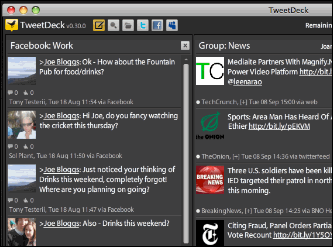
A while ago I downloaded TweetDeck, and have been using it to read and post things in Twitter. You can create groups, so it’s easy to follow the people you’re most interested in, and skim through the other posts.

I highly recommend it. And no, this isn’t a snapshot of my TweetDeck. It’s from the download site.

TweetDeck

____________

Wrapping Up the Excel Giveaway

On the Contextures Blog, I ran a week long Excel giveaway, with a nice collection of prizes from some generous sponsors.

The entries included some hilarious Excel horror stories, and a few creative Excel Hallowe’en costume suggestions. I enjoyed reading them, and the giveaway page got good traffic, so others must have enjoyed them too.

After the giveaway deadline passed, the real work began. I copied all the names, emails and comment numbers from the blog, and cleaned them up in Excel.

For a similar giveaway in July, I created a macro to draw the prize numbers and winning comment numbers. It worked very well, so I used it again for the fall giveaway.

Finally, I wrote the prize announcement post, and will email all the winners and prize sponsors with details on how to collect their prize.

A giveaway is a fair amount of work, but creates interest and traffic for a blog. I hope the prize sponsors saw some increased traffic too. If so, they might be willing to sponsor another giveaway, when we all recover from this one.

__________

Vanity URLs for Facebook Pages

It looks like Facebook has finally lowered or removed the minimum number of fans required to register a vanity URL for a page.

When the vanity URL feature was first announced, a page needed 1000 fans. Then they reduced it to 25 fans, but only for a short time. Without warning, the limit was increased to 100 fans, so my pages weren’t eligible.

Today I noticed a vanity URL announcement at the top of a page, so I went back to www.Facebook.com/username to try again.

This time I was successful, and now my Facebook pages have vanity URLs:

http://www.facebook.com/Contextures

and

http://www.facebook.com/PivotTables

__________

Online Tool To Help Publish VBA Code

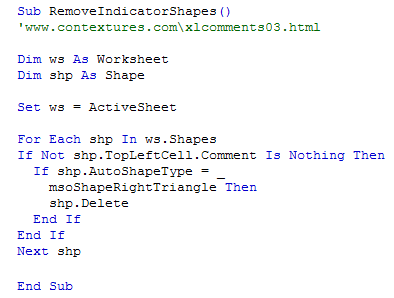
On the Contextures website, I’ve got many pages with sample VBA code for Excel. When I feel ambitious, I colour the code before I publish it, using green for the comments, and blue for the keywords.

For example, here’s some sample code from my Excel Comments Programming page.

CodeFormatted 

Free Conversion Tool

However, formatting the code takes quite a bit of time and effort, so I don’t do it for all the pages.

With the zHTML conversion tool, it will be much easier to post nicely formatted VBA code. It’s available as a free download, or as a free online tool.

Paste in your VBA code, click a button, copy the HTML code, and paste it into your website or blog.

______________