
Make it stop! I set up an iPhone shortcut, Start Timer, but it keeps repeating, every time I stop it. Where did I go wrong, and how can I fix it, so the timer runs once, and then stops?
Tip: You can jump to the Fix section, to see my quick fix. Or keep reading, to see how I got into this problem, and then got out of it!
iPhone Clock App
Every day, I use the iPhone Clock app to set timers and alarms. It’s easy to go down a rabbit hole while you’re working, and forget about the other things that need to get done!
- With alarms and timers, I get a gentle reminder to come out of that rabbit hole, and focus on something else for a few minutes.
- That helps prevent stressful times, when I realize something didn’t get done, and I have to rush to fix the situation.
But things went wrong recently, with a Timer that kept repeating automatically.
iPhone Clock Alarms
The iPhone Clock app has Alarms, and Timers, which are for different purposes.
For things that get done the same time every day or every weekday, I set an Alarm.
For example, during the summer, my intern and I had two Zoom calls every day – 9 AM and 2 PM.
- I set iPhone alarms for 8:55 AM and 1:55 PM, Monday to Friday, so I’d be ready for those calls.
- It’s important to show up on time for a business call!
iPhone Clock Timers
I use Phone timers most days too, when I want an alert after a specific amount of time.
- For example, at meal times, I set a timer for any “timed” step in a recipe. Last night, the soup had to simmer for 30 minutes, before it was ready to eat.
iPhone Shortcut Start Timer
This week, I took my Timer game to a whole new level! I created an iPhone Shortcut, to automatically start a 30 minute timer.
- The timer will remind me to stand up, and move around, after I’ve been working at my desk for 30 minutes
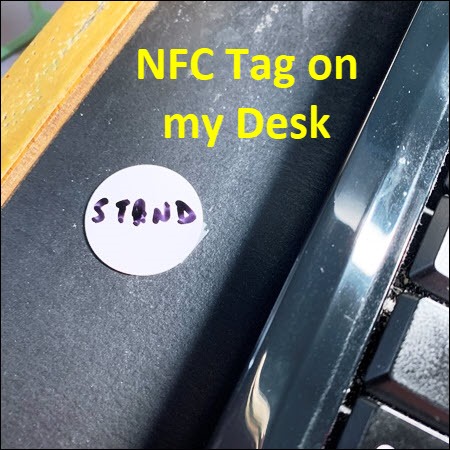
- To trigger that shortcut, I stuck an NFC tag to my desk, beside the keyboard
- When I tap the NFC tag with the top of my iPhone, it triggers the “Start Timer” shortcut.
Why Does the Timer Keep Repeating?
The NFC tag and shortcut worked well, but there was one annoying problem.
- Every time I turned the Timer off, my phone automatically started the Timer again.
Did I set it up incorrectly? Maybe I put the Start Timer action in the shortcut twice.
- Nope. I checked the shortcut, and it only had one action – Start Timer. There was no “Repeat” action.
I did a Google search, but all the articles just said that timers don’t repeat automatically.
The Fix – No More Repeating Timers!
A few hours later, I finally figured out what the problem was, and how to fix it.
As with so many technology problems, it was user error.
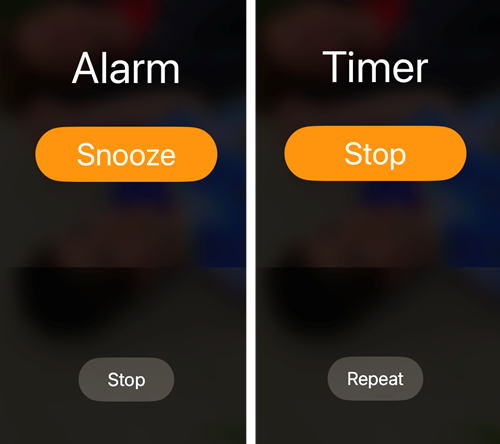
- I thought the small grey Timer button was “Stop”, just like the Alarm button.
- I was wrong. It’s a “Repeat” button.
Anyway, lessons learned.
- 1) Assume nothing.
- 2) Read all buttons carefully.
Here are the Alarm and Time screens, side by side, so you can see why careful reading is so important!
____________
iPhone Shortcut Start Timer Keeps Repeating
____________